Standard

Version History

Chapter 1: Restore a Version

 
Chapter 2: Copy a Version

 
If you have accidentally overwritten a useful scene in your video, you are now able to restore it!

  1. Open the version history panel under the dropdown menu of your video on the video page or the video listing page.
  2. Simply select the video version you want in the list.
  3. Preview and restore it.
  4. You can also make a copy of any versions in the list.
more
Standard

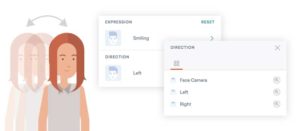
Contemporary Characters – Facing Direction

 
In storytelling, the viewpoints of characters help reinforcing the characters’ feelings and reactions. Sometimes it supports shifting narratives as well.

 
In the Expression panel, you can now change the facing directions for Contemporary characters. With this flexibility, combining actions and expressions with different facing directions has never been easier.

more
Standard

Font Size & Alignment Control

 
Auto font size, fixed font size and vertical alignment are available in the Vyond Studio.

  • Auto font size: When “Auto size” is checked (ON), text will be resized to fit into its selection box. By scaling the selection box, the font size will be changed automatically.
  • Fixed font size: When “Auto size” is unchecked (OFF), the font size will follow the number in the input menu at all times.
  • Vertical alignment: Other than horizontal alignment options, text can now be top-aligned, center-aligned and bottom-aligned within the selection box.

 
*Tip: Using keyboard ↑ ↓ arrow keys can increase or decrease the number in the input menu to the nearest 1px.

more